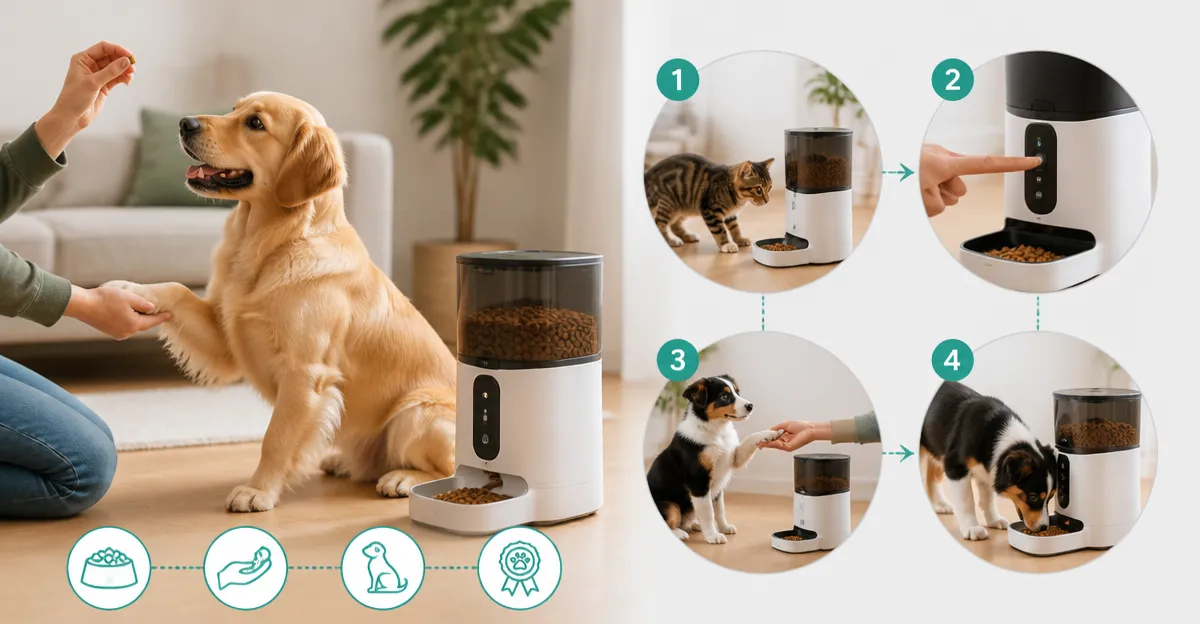
How to Use Smart Feeders for Behavior Training: A Step‑by‑Step Guide to Positive Reinforcement for Dogs & Cats
Introduction
This guide explains how pet owners can employ automatic feeders to shape desirable feeding habits while reducing stress. By integrating timed meals, voice cues, and controlled portions, one can reinforce positive behavior without constant supervision. The approach works for both dogs and cats, whether the goal is weight management, reducing begging, or preventing food stealing. Readers will acquire a clear, actionable plan that combines technology with proven training principles.
What You'll Need
- One or more smart feeders (examples are listed in the Products Mentioned section)
- Measuring tools for portion control (kitchen scale or measuring cup)
- Quiet, distraction‑free feeding area
- Optional: Battery backup or surge protector for uninterrupted operation
Step‑by‑Step Instructions
Step 1: Assess Your Pet's Feeding Requirements
Begin by calculating the daily caloric intake recommended by a veterinarian for your pet's age, weight, and activity level. Divide this total into multiple small meals to avoid rapid eating and to support steady metabolism. Recording the baseline amount on paper helps you compare future adjustments. This assessment determines the portion size you will program into the feeder.
Step 2: Choose a Feeder That Matches Your Training Goals
For multi‑pet households where food stealing is a concern, the SureFlap Microchip Pet Feeder offers RFID‑based access control, ensuring each animal receives only its designated meal. Priced at $169.99 with a 4.2/5 rating, it prevents competition and supports precise portioning. If you prefer a simpler timed dispenser, the oneisall Automatic Cat Feeder provides up to six meals per day, a 5‑second voice recorder, and a 5 L capacity, making it ideal for consistent scheduling at $47.49 (4.6/5 rating). For a budget‑friendly option with dual‑power flexibility, the IMIPAW Automatic Cat Feeder supplies 3 L storage, programmable 1‑6 meals, and battery backup at $29.99 (4.4/5 rating). Each device offers unique advantages; select the one that aligns with your pet’s temperament and your household’s technical preferences.
Step 3: Set Up the Feeder in a Stable Location
Place the feeder on a flat, non‑slippery surface away from high‑traffic zones. For outdoor or raccoon‑prone areas, weight the base with a concrete paver or bricks as demonstrated by a user of the oneisall Automatic Cat Feeder. The flat top design tolerates added weight, preventing wildlife from toppling the unit. Ensure the power adapter is within reach of an outlet, or insert fresh D‑cell batteries for uninterrupted operation during outages.
Step 4: Program the Feeding Schedule
Using the feeder’s interface or companion app, input the number of meals and portion size determined in Step 1. The Faroro Automatic Cat Feeder with Camera allows up to 15 meals per day via the Smart Life app, with portions ranging from 8‑10 g. Its 4 L hopper can sustain an adult cat for up to 15 days, reducing refill frequency. For a more straightforward LCD setup, the Voluas Automatic Cat Feeder offers 1‑4 meals and 0‑40 portion choices, each portion roughly 6‑7 g, at $37.38 (4.4/5 rating). Confirm the time zones and AM/PM settings to avoid accidental early or late meals.
Step 5: Record a Positive Voice Cue
Most smart feeders include a voice‑recording function that plays a brief message before dispensing food. This auditory cue signals to the pet that a meal is imminent, reinforcing the association between the sound and feeding. Record a calm phrase such as “It is time to eat” using the feeder’s 10‑second recorder. The oneisall Automatic Cat Feeder and the IMIPAW Automatic Cat Feeder both support this feature, helping pets anticipate meals without visual prompts.
Step 6: Implement Positive Reinforcement During Meals
When the feeder releases food, calmly praise the pet with a gentle voice and a brief petting session if appropriate. If the animal waits patiently before the food drops, reward that behavior with an extra verbal “good job.” Over several repetitions, the pet learns that calm waiting yields both food and affection, reducing frantic begging. For dogs, combine the feeder’s two‑way audio (available on the Faroro Automatic Cat Feeder with Camera) with a spoken “stay” command to strengthen obedience.
Step 7: Monitor Progress and Adjust as Needed
Use the feeder’s app or LCD display to review feeding logs, ensuring the pet consumes the intended amount. If weight loss or gain occurs, modify portion sizes accordingly. The Faroro model sends real‑time notifications for blockages, enabling swift intervention before a missed meal. For microchip‑controlled feeders, verify that each animal’s ID is correctly registered to avoid accidental feeding errors.
Tips & Pro Tips
- Start with larger portions and gradually reduce to the target amount; this prevents sudden hunger spikes.
- Place a non‑slip mat beneath the feeder to enhance stability, especially for energetic cats.
- Clean the hopper and bowl weekly; the built‑in desiccant bag (found in IMIPAW and Faroro models) maintains kibble crispness.
- Use the battery backup during holidays when power outages are common; the feeder will continue dispensing even if Wi‑Fi is lost.
- Record a consistent voice cue; changing the message frequently can confuse the pet and weaken the training association.
Troubleshooting
- Feeder does not dispense food: Check that the battery is installed correctly and that the power adapter is securely plugged in. Verify that the portion size is not set to zero.
- Food jams in the outlet: Ensure kibble size meets the manufacturer’s recommendation (e.g., <1 mm for oneisall, <0.5 inch for oneisall, 2‑15 mm for Faroro). Clean the rotor with a dry brush before re‑loading.
- Pet ignores voice cue: Re‑record the message in a calm tone and play it at a slightly higher volume. Pair the cue with a brief hand signal to reinforce learning.
- Microchip feeder fails to open: Replace the batteries with high‑quality alkaline cells (Duracell recommended) and ensure the RFID tag is not near strong electromagnetic sources such as microwave ovens or circuit breakers.
Conclusion
By following these seven steps, pet owners can harness smart feeders to deliver consistent meals, reinforce calm waiting, and prevent food‑related conflicts. The combination of timed dispensing, voice cues, and access control creates a structured environment that supports positive reinforcement training. Whether one chooses a budget‑friendly model like the IMIPAW feeder or a high‑tech solution such as the Faroro feeder with camera, the core principles remain the same: consistency, clarity, and compassionate reinforcement. Implement the plan, observe your pet’s response, and adjust gradually to achieve lasting behavioral improvements.
Products Mentioned in This Guide
Frequently Asked Questions
What is a smart feeder and how does it support positive reinforcement?
A smart feeder automatically dispenses pre‑set portions at scheduled times, rewarding desired feeding behavior without constant supervision.
How do I set up timed meals and voice cues on a smart feeder?
Use the feeder’s app or control panel to program meal times and upload or record a cue voice that plays just before each dispense.
What equipment do I need besides the smart feeder?
A kitchen scale or measuring cup for portion control, a quiet feeding area, and optionally a battery backup or surge protector.
Can smart feeders help with weight management for pets?
Yes, by delivering exact calorie portions throughout the day, they prevent overeating and support vet‑recommended diet plans.
What should I do if there is a power outage affecting the feeder?
Ensure the feeder has a battery backup or connect it to a surge protector so it continues dispensing scheduled meals during outages.